
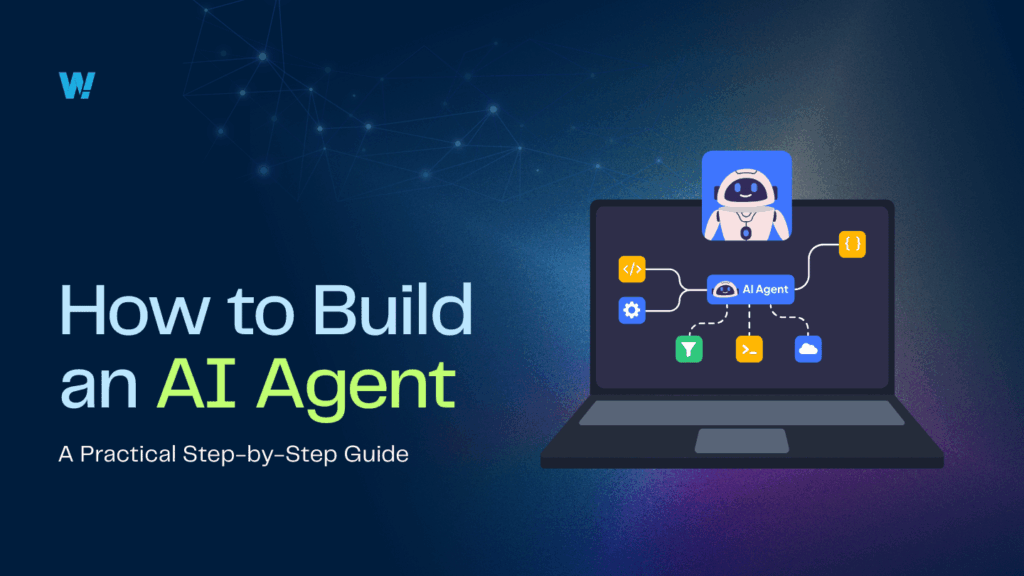
To build an AI agent, define its goal and available tools, choose a model, add a memory and planning loop, connect it to real APIs, then wrap it in guardrails and human review. A working demo takes days. A production agent also needs error handling, evaluation, cost ceilings, and monitoring.
There is no shortage of tutorials promising a working agent in ten minutes, and most of them deliver. The problem arrives later, when the thing that impressed everyone in a demo meets real users, real data, and real consequences. This guide covers both halves: how to build an AI agent that works, and what separates it from one you can actually put into production.
About Wow Labz: Wow Labz is an AI-native custom software development company based in Bengaluru, India. Since 2011 it has shipped 400+ products across 15+ years, won 30+ awards, and touched 100M+ lives, for clients including Coca-Cola, AB InBev, HDFC, Emaar and UCSF. It holds a 5.0 rating across 23 verified Clutch reviews and is ISO 27001 certified.
What an AI agent actually is
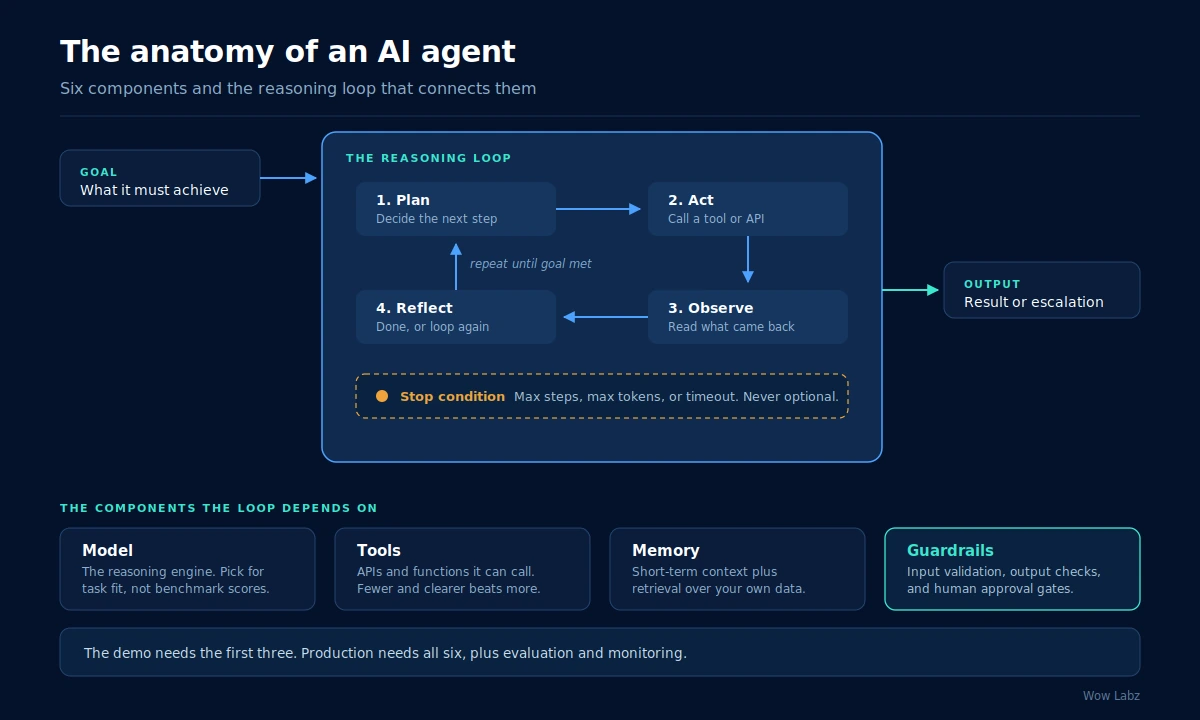
An AI agent is a system that pursues a goal by reasoning in a loop rather than answering once. Give a chatbot a question and it responds. Give an agent a goal and it plans a step, takes an action, reads the result, and decides what to do next, repeating until the goal is met or a stop condition fires.
That loop is the entire distinction, and it is why agents are harder to build well than they look. A single response either satisfies the user or it does not. An agent taking twelve steps has twelve chances to go wrong, and each error compounds into the next step’s input.
The anatomy of an AI agent
Six components make up a working agent. The first three get you a demo. All six are needed before anyone outside your team touches it.
- Model. The reasoning engine. Choose it for fit with your specific task rather than for headline benchmark scores, and test at least two before committing.
- Tools. The APIs and functions the agent can call. Fewer, clearly described tools consistently outperform a long list, because ambiguity in tool descriptions is a leading cause of wrong actions.
- Memory. Short-term context for the current run, plus retrieval over your own data for anything the model was not trained on.
- Planning loop. How the agent decides its next step. This can be a simple loop, a defined graph, or a plan-then-execute structure.
- Guardrails. Input validation, output checking, and human approval gates at the points that carry real consequences.
- Observability. Logging of every input, output, and decision, so you can explain behaviour weeks later and tell whether a change improved things.
How to build an AI agent in seven steps
- Define the goal and the success metric. Write down, in one sentence, what the agent should accomplish and how you will measure whether it did. Vague goals produce agents that wander. If you cannot state the success metric, you are not ready to build.
- Inventory the tools it needs. Agents are only as capable as the actions available to them. List the specific APIs, databases, and functions it needs, and write a clear description for each one. Ambiguous tool descriptions cause more failures than weak models do.
- Choose a model. Start with a strong general model to prove the concept, then evaluate cheaper or faster options once the workflow is stable. Do not optimise for cost before the agent works.
- Build the loop. Connect the model to the tools and let it iterate: plan, act, observe, reflect. At this stage you are proving the agent can reach the goal at all, on inputs you have chosen.
- Add memory and retrieval. Most useful agents need facts the model never saw in training. Add retrieval over your documents, database, or knowledge base so the agent grounds its reasoning in your reality rather than a plausible guess.
- Add guardrails and stop conditions. Decide what happens on a timeout, a malformed response, and a tool failure. Set a hard ceiling on steps and tokens per run. Then decide which actions require a human to approve before they execute.
- Build an evaluation set. Assemble twenty to fifty realistic test cases, including the awkward ones, and run them before every change. Without an evaluation set you are guessing about whether your agent is improving.
Steps one through four are the tutorial. Steps five through seven are the reason most agent projects take longer than expected, and skipping them is the most common cause of a pilot that never ships.
Can you build an AI agent without coding?
Yes, and for some use cases it is the right call. No-code platforms let you assemble an agent by connecting steps visually, and for internal workflows with modest stakes they work well. If you need a research assistant that summarises a weekly report, no-code will do the job in an afternoon.
The limits show up in three places. Integrating with systems the platform does not natively support is difficult. Custom error handling and evaluation are usually shallow or absent. And anything touching regulated data, customer-facing decisions, or auditability tends to hit a wall that only custom code gets past.
A reasonable rule: prototype with no-code to validate the idea and learn what the workflow actually needs, then rebuild in code if it turns out to be consequential.
Choosing a framework
Four frameworks lead in 2026. LangGraph is graph-based and deterministic, which suits systems that need replayable, auditable runs. CrewAI takes a role-based approach where agents hold fixed roles like a team. Microsoft Agent Framework converges the earlier AutoGen and Semantic Kernel projects and fits Microsoft-aligned stacks. The OpenAI Agents SDK is well suited to rapid prototyping where OpenAI models are already the default.
The framework matters less than teams expect, because the hard parts sit above it: access control, cost limits, evaluation, and compliance evidence. We covered the tradeoffs in more depth in our guide to evaluating AI agent frameworks, which is worth reading if you are at the shortlisting stage.
The gap between a demo and production
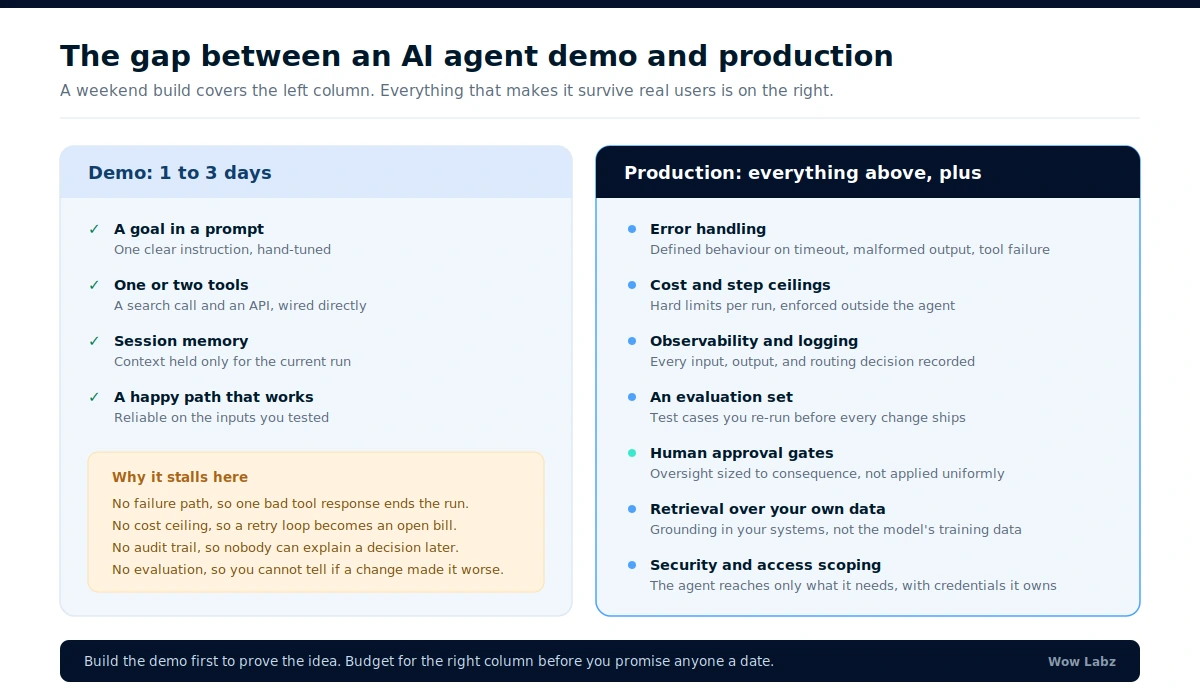
This is where the honest conversation belongs. A weekend build covers the goal, a couple of tools, session memory, and a happy path that works on the inputs you tried. Everything that makes an agent survive contact with real users is the part that gets skipped.
The industry data reflects this gap plainly. Gartner projects that over 40% of agentic AI projects will be canceled by the end of 2027, citing escalating costs, unclear business value, and inadequate risk controls. MIT’s NANDA report found that 95% of enterprise generative AI pilots deliver no measurable business impact, attributing the failure to weak integration rather than weak models. Neither finding is about model capability. Both are about the engineering around the model.
The five failure modes we see most
- No failure path. A prototype assumes every call succeeds. Production does not. Define behaviour for timeout, malformed output, and tool failure explicitly.
- Runaway cost. A retry loop without a ceiling becomes an unbounded bill. Enforce step and token limits at the orchestration layer, not inside the agent’s own judgement.
- No audit trail. When someone questions a decision six weeks later, nobody can reconstruct why the agent acted. Log from the first commit, not after the first incident.
- No evaluation. Without test cases, every prompt change is a coin flip. Teams frequently make agents worse while believing they are tuning them.
- Oversight in the wrong places. Autonomy gets applied uniformly instead of scaled to consequence. Low-stakes steps should run unattended; consequential ones should pause for a person.
What it costs, realistically
Three cost centres matter, and only the first is obvious. The build itself is usually the smallest. Inference costs scale with usage and with how many steps each run takes, which is why step ceilings are a budget control rather than just a safety measure. And ongoing ownership, meaning evaluation, monitoring, and updates as models change underneath you, is the line most teams never budget for.
A useful planning heuristic: whatever the initial build costs, assume the same again annually to keep the agent reliable. If that number makes the project unattractive, the honest answer is that this workflow may not warrant a custom agent.
How Wow Labz builds production AI agents
Wow Labz builds AI agents the way they have to run in the real world: guardrails and human checkpoints designed in from the start, observability from the first commit, and an evaluation set before anything reaches a user. Our agentic delivery platform, NeoCrew, is how we compress this into days rather than the weeks a traditional build takes, without giving up control or accountability.
If you are past the prototype stage and trying to work out what production actually requires, that is exactly what our AI agent development team scopes in a Discovery Sprint.
Got a working agent prototype that is not ready for users?
That is the most common place teams get stuck, and it is usually a scoping problem rather than a technical one. In a Discovery Sprint we review what you have built, identify the specific gaps between it and production, and give you a fixed estimate to close them. Tell us about your agent project and we will give you a straight assessment of what is left to do.
Frequently asked questions
Can I build AI agents without coding?
Yes. No-code platforms let you assemble agents visually and work well for internal workflows with modest stakes. They struggle with custom integrations, deep error handling, evaluation, and anything requiring auditability or regulated data handling. Prototype with no-code, then rebuild in code if the workflow turns out to be consequential.
Can you build an AI agent with ChatGPT?
You can build a useful assistant with ChatGPT’s custom GPTs, and for personal or light internal use that is often enough. For a production agent you need programmatic control over the loop, tool calls, error handling, and logging, which means working with an API and a framework rather than a chat interface.
Is it free to build an AI agent?
You can build a prototype at no cost using open-source frameworks, local models, and free tiers. Running one in production is not free: inference costs scale with usage and with the number of steps per run, and you also carry ongoing costs for monitoring, evaluation, and maintenance.
How long does it take to build an AI agent?
A working prototype takes one to three days for a well-scoped task. A production-ready agent with guardrails, evaluation, retrieval, and monitoring typically takes four to eight weeks, and the long pole is usually data access and quality rather than the agent logic itself.
What is the hardest part of building an AI agent?
Not the model, and not the framework. The hardest parts are defining a goal narrow enough to be achievable, getting reliable access to the data the agent needs, and building the evaluation set that tells you whether changes are helping. Teams consistently underestimate all three.
Do I need a multi-agent system or will one agent do?
Start with one agent. A single agent handling one well-scoped task is easier to build, test, and debug. Move to multiple agents only when the task genuinely splits into distinct specialisms, and expect to add an orchestration layer when you do.